Cron jobs
Cron jobs run a command inside one of your service’s containers on a schedule — handy for maintenance tasks, report generation, cache warming, and the like.
From the dashboard
Section titled “From the dashboard”- Open a service and go to its Cron tab.
- Click New cron job and give it a name.
- Enter a schedule (a standard cron expression, e.g.
0 3 * * *) and the command to run inside the container. - Save. Leave it enabled, or create it paused and enable it later.
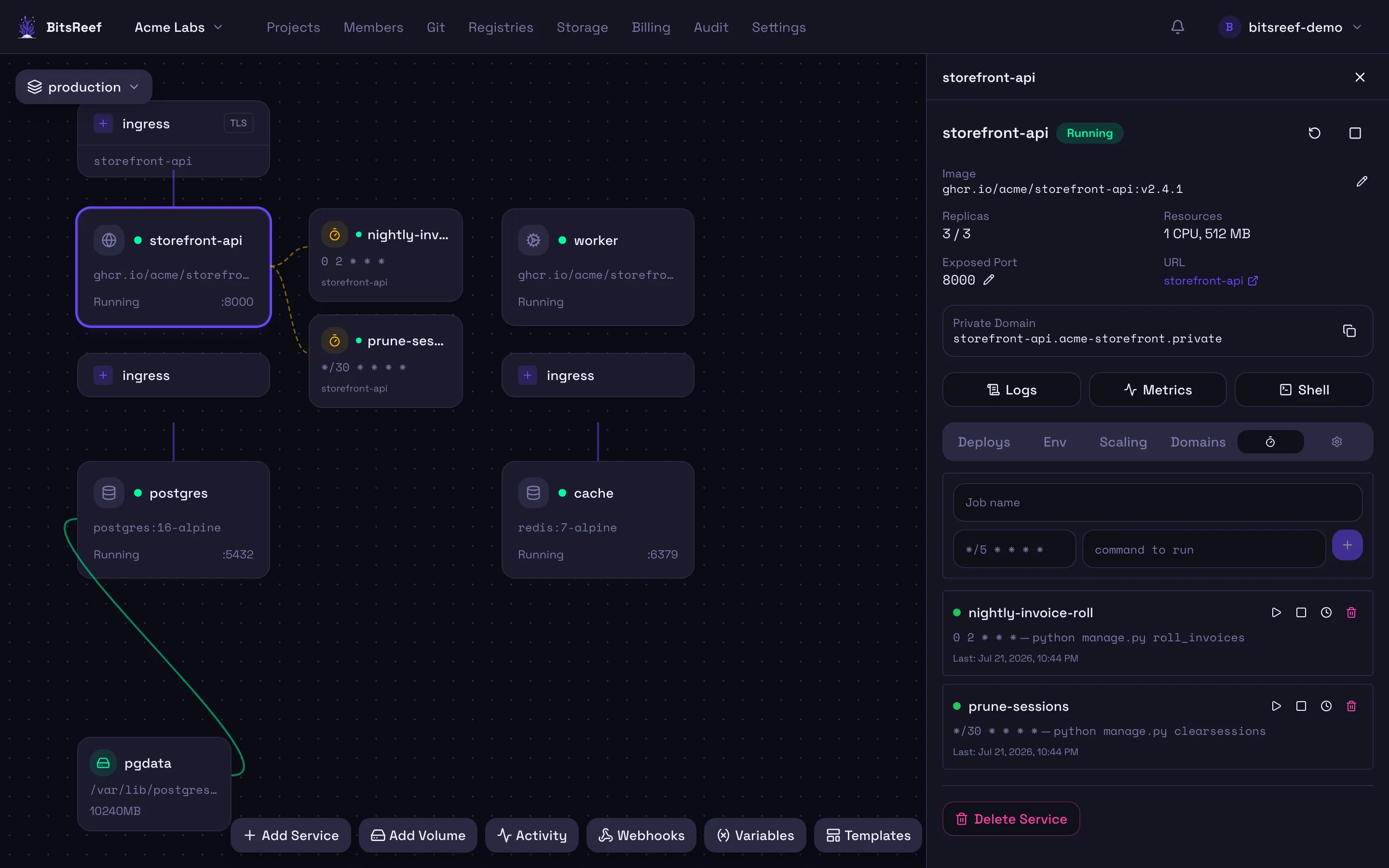
From the Cron tab you can also run a job now (out of schedule) and review its run history — each run records its status, exit code, and timing.
From the CLI
Section titled “From the CLI”bitsreef cron create nightly-cleanup \ --schedule "0 3 * * *" \ --command "python manage.py cleanup" \ --service web
bitsreef cron list --service webbitsreef cron trigger nightly-cleanup --service web # run nowbitsreef cron runs nightly-cleanup --service web # run historybitsreef cron delete nightly-cleanup --service webCron jobs vs. scheduled functions
Section titled “Cron jobs vs. scheduled functions”A cron job runs a command inside an existing service — reusing that service’s image, env, and volumes. A scheduled function runs standalone code on a schedule without a long-running service. Use whichever fits.